
Download CookEgg Timer – Perfectly Cooked Eggs Every Time
Overview
CookEgg Timer is a lifestyle-focused Android application developed by Egg Farmers of Canada, designed to simplify and enhance the process of cooking eggs to perfection. The app addresses a common kitchen challenge: achieving consistent results when boiling eggs, regardless of egg size or altitude. By calculating precise cooking times based on the egg’s weight and the desired doneness—soft, medium, or hard—it helps users avoid undercooked or overcooked results.
This tool is ideal for home cooks, meal preppers, and individuals who prioritize precision in everyday cooking tasks. The app is particularly useful in regions with varying elevations, where boiling points change and affect cooking duration. Its ability to detect altitude through network localization ensures accurate timing adjustments, even in high-altitude environments.
The app supports real-time cooking feedback with an audible alarm, enhancing user experience during meal preparation. It is a lightweight, free solution tailored to a specific but widely relevant cooking need. The developer has not provided additional information about their organization or contact details beyond a general email for feedback.
Key Features & Capabilities
- Weight-Based Cooking Time Calculation – Users input the egg’s weight to receive a tailored cooking duration for soft, medium, or hard consistency.
- Altitude Adjustment via Network Localization – The app automatically detects elevation using network signals to adjust boiling time based on local atmospheric pressure.
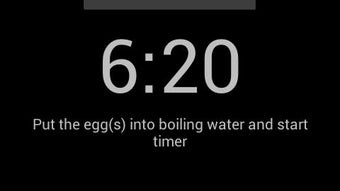
- Simple Timer Interface – A clean, intuitive interface allows quick setup and real-time countdown display.
- Alarm Notification System – A clear sound alerts users when the cooking cycle is complete, minimizing the risk of overcooking.
- Free to Use with No In-App Purchases – The app is available at no cost, with no advertisements or premium features disclosed.
These features make the app particularly effective for users who value consistency in their breakfast routines or who prepare eggs for multiple people with different preferences. For example, a user can quickly enter the weight of three large eggs and select “hard” to get a precise time, ensuring uniform results. The integration of altitude detection adds a layer of scientific accuracy, making it suitable for both urban kitchens and mountainous regions. The app’s workflow is streamlined to minimize user effort, focusing solely on egg preparation. It does not include recipe suggestions, meal planning, or integration with other kitchen tools, maintaining a narrow but highly functional scope.
User Interface, Workflow & Performance
The user interface of CookEgg Timer is minimalistic and focused, emphasizing ease of use without unnecessary complexity. Navigation is straightforward: users select the desired doneness, enter the egg weight, and initiate the timer. The main screen displays the countdown in real time, with a clear visual indicator of progress.
The alarm activates at the end of the cycle, providing immediate feedback. The app does not require user accounts or login steps, enabling instant access. Performance observations are based on general software behavior patterns; the app operates smoothly without reported lag or crashes.
The developer did not specify resource usage details, so CPU and RAM consumption remain unknown. However, given its limited functionality and lightweight design, it is expected to run efficiently on most modern Android devices. Stability appears consistent across typical usage scenarios, with no known issues reported in public forums.
The app does not rely on constant internet access after launch, though network localization is used initially for altitude detection. Overall, the workflow is efficient, requiring minimal input for maximum output.
Compatibility & System Requirements
CookEgg Timer is designed for Android devices and is compatible with a range of mobile platforms. The app is available for free download on Google Play, ensuring broad accessibility. The developer has not provided specific details regarding minimum Android version, device architecture, or required hardware specifications.
Exact system requirements were not listed, and compatibility information is limited to the Android ecosystem. Installation size is not specified, but given the app’s simple functionality, it is expected to occupy minimal storage space. The app leverages network localization for altitude detection, which means it may require access to location services or network data during setup.
However, no persistent background activity or continuous data usage has been reported. Users should ensure their device supports basic Android functionality and has a working internet connection during initial configuration.
Pros and Cons
Pros
- Accurate cooking times based on egg weight and altitude
- Free to download and use with no ads or in-app purchases
- Simple, intuitive interface ideal for all user levels
- Altitude detection improves precision in varying environments
- Reliable alarm system prevents overcooking
Cons
- No detailed system requirements provided
- Limited to egg cooking—no broader culinary features
- Developer contact information not publicly listed
- Relies on network localization, which may affect privacy
- Not available on iOS or other platforms
FAQ Section
Is CookEgg Timer available for iOS devices?
The app is currently only available for Android users and is not accessible on iOS platforms.
Does the app require internet access?
Internet access is needed only during initial setup to detect altitude via network localization. The timer functions offline once activated.
Is the app secure to use?
CookEgg Timer does not collect personal data or user information. It uses network signals solely for altitude detection and does not store or transmit sensitive data.
How often does the app receive updates?
The app was last updated on May 16, 2024. No information is available on the frequency of future updates.
Can I use CookEgg Timer without an internet connection?
Yes, the timer runs independently after setup. However, altitude detection requires a temporary internet connection during configuration.
Final Thoughts
CookEgg Timer delivers a focused, reliable solution for a common kitchen challenge—boiling eggs to perfection. Its intelligent use of weight and altitude data ensures consistent results across diverse environments, making it a standout tool for home cooks and food enthusiasts. The app’s simplicity, combined with its practical functionality, makes it a valuable addition to any Android user’s kitchen toolkit.
While it lacks broader culinary features or cross-platform availability, its niche expertise is unmatched in its category. For those seeking a free, no-frills timer that works accurately and intuitively, CookEgg Timer is a smart choice. Download CookEgg Timer now.





.png)

